
Google started rolling out its September 2026 spam update on September 24. The update applies globally and across all languages, and Google says the rollout may take up to two weeks. For website owners, that makes the next several days less about reacting to every ranking movement and more about understanding what actually changed.
A spam update does not automatically mean that every ranking drop is a penalty. Search visibility can move while Google recalculates results, competitors can gain or lose positions, and pages that previously benefited from weak signals may be reassessed. The useful question is not simply, “Did traffic fall?” It is, “Which pages, queries and sections changed, and is there a pattern?”
This guide is written for business owners, marketers and website managers who want a practical way to review their site without making rushed changes during an active Google update.
What is the September 2026 Google spam update?
Google confirmed that the September 2026 spam update began on September 24 and affects search rankings worldwide. Spam updates are designed to improve Google’s ability to identify practices that violate its spam policies, rather than introducing a completely new ranking system for one specific industry.
Those policies cover a wide range of practices, including keyword stuffing, link spam, hidden text, doorway pages, scaled low-value content, hacked content and other techniques created primarily to manipulate search visibility.
For a normal business website, the most important point is that you should not assume a drop means the entire domain has a serious problem. Start with data. A homepage losing two positions for one broad keyword is very different from dozens of service pages losing most of their impressions at the same time.
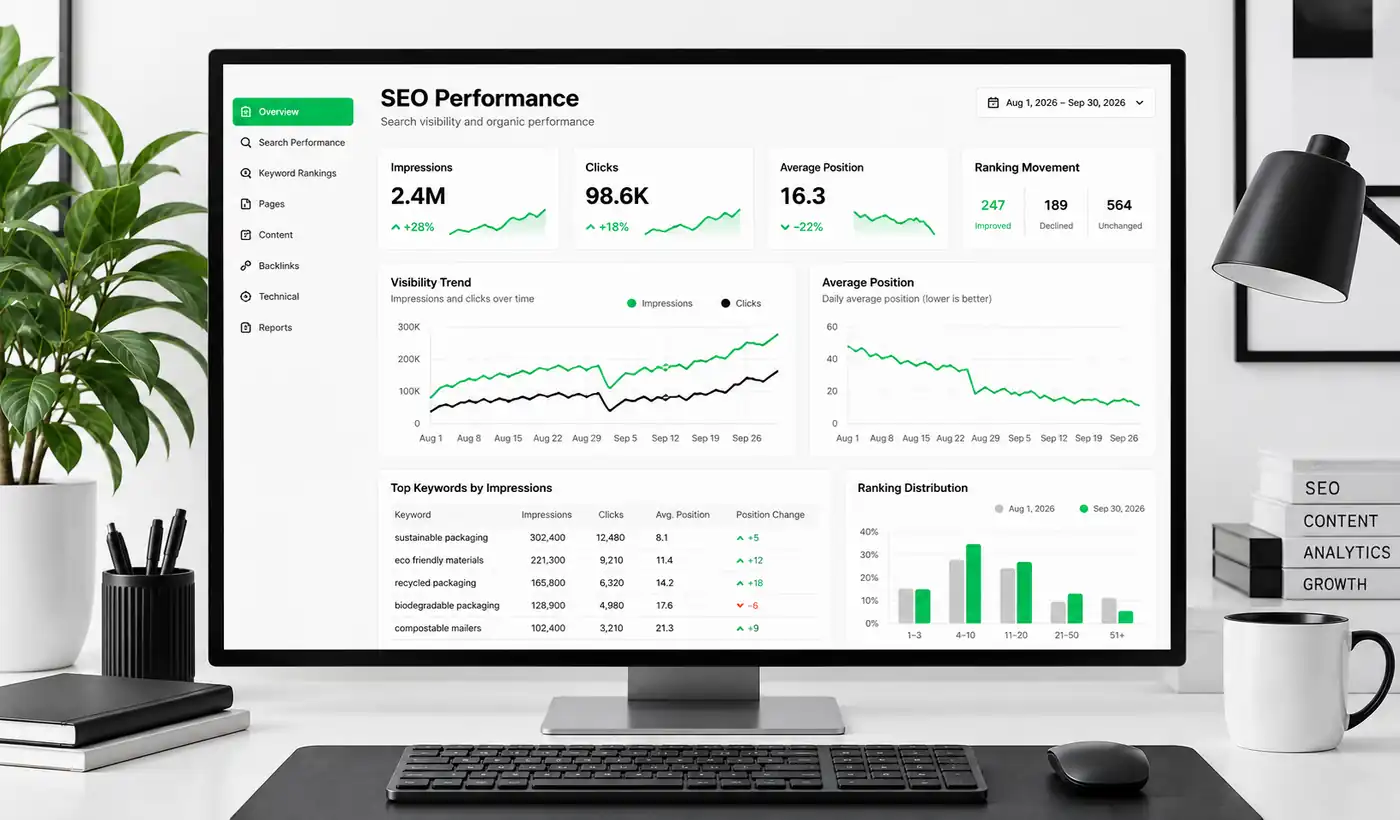
Do not judge the update from one day of traffic
An active rollout can create unstable comparisons. If you normally receive moderate organic traffic, a single day can be influenced by seasonality, weekday patterns, campaigns, news cycles and normal ranking movement.
Open Search Console and compare the affected period with a useful baseline. Look at clicks, impressions, average position and the individual queries that changed. Then separate branded searches from non-branded searches. If people still find your company by name but discovery traffic has fallen, the issue may be concentrated around informational or commercial keywords rather than overall website visibility.
The same principle applies at page level. Group your homepage, service pages, product or category pages and blog content separately. A clear pattern is far more useful than a site-wide average.
What to check first
Start with the pages that lost the most impressions, not the pages that merely moved one or two ranking positions. Check whether those URLs still match the intent behind the queries they previously ranked for, whether the content is genuinely useful and distinct, and whether the page has become weaker than competing results.
If your website depends on organic leads, combine this review with a broader Blyfa website audit instead of treating ranking data in isolation.
A practical audit for website owners
| What you see | What to investigate | What not to do immediately |
|---|---|---|
| A few pages lose impressions | Search intent, content usefulness, competing pages and internal links | Rewrite the whole website |
| Many similar pages drop together | Template quality, duplication, thin pages and scaled content patterns | Create more near-identical pages |
| Clicks fall but impressions stay similar | Ranking positions, titles, snippets and SERP changes | Assume the domain has been penalised |
| Important pages disappear from search | Indexing status, canonical tags, robots directives and manual actions | Wait weeks without checking Search Console |
1. Check whether the problem is ranking or indexing
A page that still appears in Google but ranks lower needs a different investigation from a page that has disappeared from the index. Use URL Inspection for important URLs and check whether Google can index the page normally.
If indexing is the real issue, changing headings or adding more keywords is unlikely to solve it. Technical causes such as canonical conflicts, accidental noindex directives or crawl problems need to be ruled out first.
2. Look for pages created mainly to capture variations of the same keyword
Businesses often accumulate near-duplicate landing pages over time: the same service rewritten for many locations, several articles answering almost the same question, or pages that exist because a keyword tool showed a slightly different phrase.
Not every similar page is spam. Separate pages can be useful when they serve genuinely different needs. The concern begins when the page has little independent value and primarily exists to occupy another search result.
3. Review content that was produced at scale
Google’s spam policies focus on the purpose and value of scaled content, not simply whether AI was involved. A business can use AI as part of a legitimate editorial workflow. The risk is publishing large volumes of unoriginal pages that add little value and are created mainly to influence rankings.
Review batches of content that were published quickly. Ask whether each page contains information that is specific, useful and worth maintaining. If removing the company name would make ten pages almost interchangeable, they probably need stronger differentiation.

4. Review internal linking without turning it into keyword stuffing
Internal links should help users reach the next useful page and help search engines understand how your content relates. They should not feel like a block of repeated exact-match anchor text added purely for SEO.
For a service business, an article that discusses a real website problem can naturally lead to the relevant service or a project showing how that problem was handled. For example, a discussion about underperforming page structure can point readers toward a real website page redesign project when that project provides useful context.
You can also direct users toward the broader Blyfa projects archive when they want to see practical examples rather than another explanatory article.
5. Check whether old content still deserves its rankings
A page may have ranked well for years and still become less useful. Products change, screenshots become outdated, recommendations lose context and competitors publish clearer answers. An update can expose that gap even when the page was not created with manipulative intent.
Prioritise pages that already receive impressions and have commercial relevance. Improving an established page with weak sections is usually more sensible than publishing several new articles around the same keyword.
What if your rankings increased?
An increase during a spam update is useful information too. It may mean competing pages lost visibility, Google is interpreting your content differently, or normal ranking changes happened at the same time. Avoid treating an early increase as permanent while the rollout is still active.
Instead, record which pages gained impressions and which queries drove those gains. If those pages have a clear structure, strong intent match and useful supporting content, they can show you what is working across the site.
Useful rule: make changes because the page needs them, not because a graph moved for 24 hours. During an active rollout, evidence is more valuable than activity.
Should you change titles, content or URLs during the rollout?
Small fixes that are clearly needed can still be made. If a page has an incorrect title, broken link or outdated information, there is little reason to preserve the problem. What is harder to evaluate is a major redesign or rewrite performed only because traffic moved during the first days of an update.
Large simultaneous changes remove your baseline. If rankings later recover or fall further, you will not know whether the Google update, your edits or both caused the result.
For important commercial pages, document the current version first. Record key metrics, note the date of any edits and make changes in logical groups. That creates a useful history for future SEO decisions.
How to decide whether a page actually needs improvement
Read the page as a potential customer rather than as an SEO checklist. Can they quickly understand what the page offers? Does it answer the questions that would prevent them from taking the next step? Are examples, proof and relevant details easy to find? Does the page feel written for a real decision rather than assembled around a keyword?
Then review the search results for the queries that matter. Look at the kinds of pages Google is currently showing. A service query may favour commercial pages, while an informational query may favour guides. If your page format does not match the need behind the search, adding another thousand words may not help.
Design also matters when it affects usability. A technically complete article can still perform poorly for users when headings are unclear, paragraphs are difficult to scan or important next steps are buried. If the problem is presentation rather than the subject itself, a focused page redesign can be more useful than another round of keyword edits.
A simple monitoring plan for the next two weeks
- Record the rollout start date so you do not compare unrelated periods.
- Track Search Console clicks and impressions for your most important pages.
- Separate branded and non-branded search changes.
- Check indexing for pages that disappear or lose most of their impressions.
- Review manual actions and security issues in Search Console.
- Flag thin, duplicated or mass-produced sections for a deeper content review.
- Avoid publishing several near-identical pages just to replace lost traffic.
- Wait for a clearer post-rollout pattern before drawing site-wide conclusions.
The goal is not to watch rankings every hour. It is to build enough evidence to make one good decision when the update settles.
What this update means for a normal business website
Most legitimate businesses do not need to respond to every Google update with a complete SEO overhaul. They do need to know whether their website has accumulated weak practices over time: duplicated landing pages, outdated articles, excessive keyword targeting, poor internal navigation or content published simply to increase page count.
The September 2026 spam update is a useful reason to review those areas, but the same work improves the site even without an algorithm update. Useful pages, clear structure and content built around genuine customer needs remain easier to maintain and easier to evaluate.
If your site has changed noticeably during this rollout, document the affected pages first. Then investigate the pattern before editing. That approach is slower than reacting to every fluctuation, but it gives you a far better chance of fixing the right problem.

Short comments related to this article.